Discovery: See What's Installed and Bring It Under Management
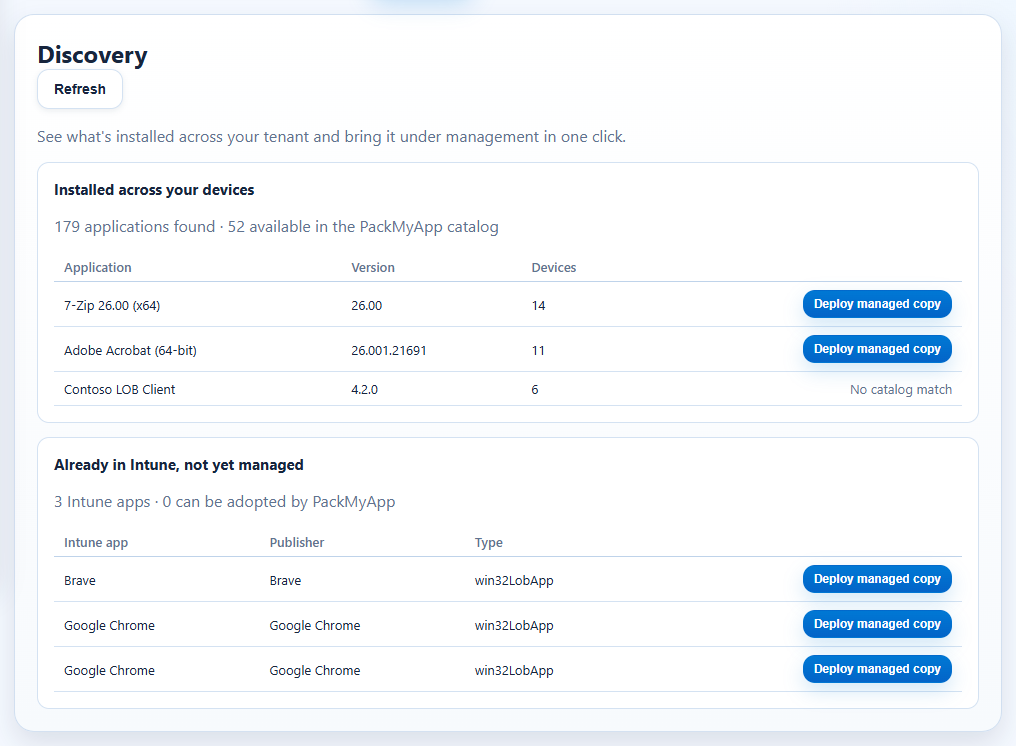
The Discovery tab shows what is actually installed across your tenant — and which of
those applications you can bring under PackMyApp management in one click.
Prerequisites
- A linked Intune tenant (Discovery reads Intune's detected-apps inventory).
- Tier MVP or higher.
Click Path
- Open
Appand switch to theDiscoverytab. - Review the two panels: - Installed across your devices — software Intune detected on enrolled devices, with version, device count, and a PackMyApp catalog match where available. - Already in Intune, not yet managed — apps that exist in your Intune tenant but aren't managed by PackMyApp yet (migration scan).
- Click
Deploy managed copyon any matched row — the catalog opens pre-filtered on that app so you can deploy the managed version through the wizard. - Use
Refreshto re-scan after devices check in.
Expected Result
- A live view of unmanaged software across the tenant, with a one-click path from "installed somewhere" to "managed, updated, and reported by PackMyApp".
If It Fails
Sign in and link an Intune tenant…— connect a tenant first (Settings > Customer Workspace).…available for Tier MVP and higher— your tier does not include Discovery yet.- Empty tables are normal on a fresh tenant: Intune reports installed apps only after devices check in.